 How-to
A DIY On-Page SEO Checklist for Beginners in 2026
Last Updated: November 7, 2026
Quick Summary
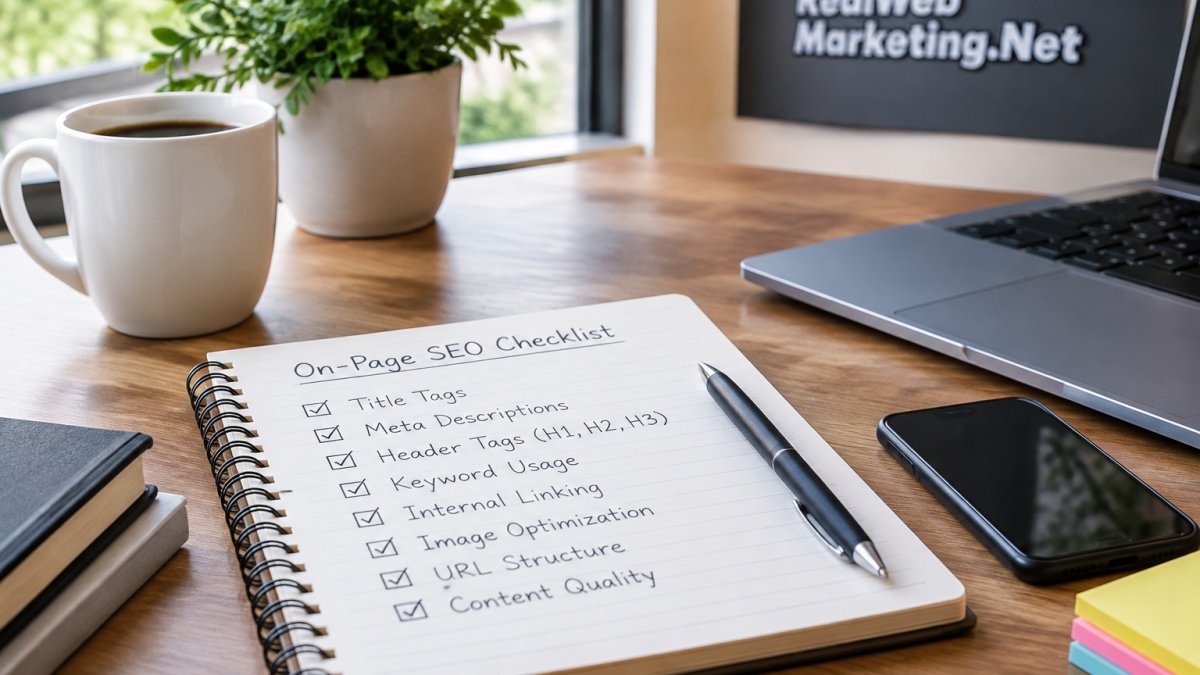
A DIY on-page SEO checklist for beginners runs five steps in order: keyword research and intent mapping, content and headings, title tag and meta description, a technical pre-publish check, and measuring results in Search Console. Pick one primary keyword per page and match the format to intent. Keep titles near 60 characters and descriptions near 155.
- Pick one primary keyword per page, then assign secondary and long-tail phrases as supporting sections.
- Put the primary keyword in the H1, first paragraph, and at least one H2, using variations instead of repeats.
- Keep titles near 60 characters and meta descriptions near 155 characters.
- Two to four internal links per page with clear anchor text is a reasonable starting point.
- Track impressions, click-through rate, and average position in Search Console, changing one thing at a time.
Table of Contents
- Why a Repeatable On-Page SEO Checklist Beats Guesswork
- Step 1: Keyword Research and Search Intent Mapping
- Step 2: On-Page SEO Best Practices for Content and Headings
- Step 3: SEO Title and Meta Description Examples You Can Copy
- Step 4: Run a Technical SEO Checklist Before You Publish
- Step 5: Verify Your Changes and Measure Outcomes
- Common Beginner Mistakes and SEO Myths to Ignore
- Grab the On-Page SEO Checklist PDF and Prioritize by Impact
- Frequently Asked Questions
Why a Repeatable On-Page SEO Checklist Beats Guesswork
Most beginners treat on-page SEO like a light switch: flip a few settings, publish, and hope.
Small business owners often burn months tweaking pages with no system. The fix is not more effort.
On-page SEO is the practice of adjusting what lives on a page itself: the content, headings, title tag, meta description, URL, images, and links.
A checklist matters because search engines reward pages that answer a query clearly and load reliably.
Step 1: Keyword Research and Search Intent Mapping
Start with the query, not the page. Pick one primary keyword per page, then map every other phrase to it. Beginners skip this step, and it decides everything after.

Here is how we would run it:
- Write down 5 to 10 phrases a customer would actually type.
- Group them by intent: learning, comparing, or ready to buy.
- Choose one primary keyword for the page.
- Assign secondary and long-tail phrases as supporting sections.
Finding Long-Tail Keywords with Free Tools
Long-tail keywords are longer, more specific phrases with lower competition.
You can run this research without paid software. If you want a shortlist of free and low-cost options, see our guide to the best SEO tools for small business owners.
Intent mapping is where most beginners go wrong. For a closer look, read our breakdown of aligning landing page content with search intent.
Step 2: On-Page SEO Best Practices for Content and Headings
Content and headings carry the most weight in any on-page SEO best practices list. Write for the reader first, then place keywords where they read naturally.
The structure that works:
- One H1 that states the page topic
- H2s that cover each subtopic a reader expects
- H3s only where a section needs breaking up
Placing Keywords Naturally in Page Content
Put the primary keyword in the H1, the first paragraph, and at least one H2. Then use variations, not repeats. Search engines read related phrasing well, and readers find it less clumsy.
A common mistake is stuffing the exact phrase into every paragraph. It reads badly and helps nothing. Write the sentence first, then check whether a natural keyword fits.
Step 3: SEO Title and Meta Description Examples You Can Copy
The title tag and meta description decide whether anyone clicks. Both are short, both are visible in results, and both are easy to get wrong. This is the section where a before-and-after comparison teaches faster than any rule, so every pattern below comes with a weak version and a fixed version.
What the title tag actually does
The title tag is the clickable headline in search results, the phrase a browser tab shows, and the default label when someone shares the page.
Keep titles near 60 characters, roughly where Google truncates on desktop, so put the main phrase early and let the tail get cut if it must. Write the description as a reason to click, not a summary of the page.
Before-and-after title examples
- Weak: "On-Page SEO | SEO Services | Real Web Marketing Inc." Fixed: "On-Page SEO Checklist for Beginners: 5 Steps That Work" Why it works: the weak version repeats the brand and stacks service terms; the fixed version names the reader, the format, and the payoff.
- Weak: "How to do SEO" Fixed: "How to Do On-Page SEO in 2026 (Beginner Checklist)" Why it works: the fixed version adds the year and the format so the searcher knows what they are getting before they click.
- Weak: "SEO Tips - Blog" Fixed: "9 On-Page SEO Tips for New Websites (With Examples)" Why it works: a number and the word "examples" set an expectation the page can meet.
Before-and-after meta description examples
- Weak: "We offer on-page SEO services. Contact us to learn more." Fixed: "A five-step on-page SEO checklist for beginners. Learn keyword mapping, headings, titles, and the technical checks to run before you publish." Why it works: the weak version sells; the fixed version promises a specific process and lists what the reader will learn.
- Weak: "Read our blog about SEO." Fixed: "New to SEO? Follow this beginner on-page SEO checklist, step by step, with free tools and a pre-publish check you can finish in under an hour." Why it works: it names the audience, the time cost, and the outcome.
Keep descriptions near 155 characters. Google often rewrites them from page text, so the description is a suggestion, not a guarantee, but a well-written one is frequently the version shown.
The mechanism behind the click
A title and description work as a pair: the title earns the scan, the description earns the click. If your page ranks on page one but clicks stay low, the title probably repeats the query without adding a reason, the description reads like boilerplate, or the title promises something the page does not deliver.
Watch out: do not stuff the exact keyword into both the title and the description twice. It reads as spam to searchers and gives you no extra ranking benefit.
A quick pre-publish check
- Primary phrase appears early in the title
- Title is near 60 characters and reads like a sentence fragment, not a keyword list
- Description is near 155 characters and states a benefit or a specific outcome
If you want the wider context for how titles and descriptions fit into a full page plan, our beginner guide to building an SEO strategy shows where this step sits.
Step 4: Run a Technical SEO Checklist Before You Publish
A technical SEO checklist catches the problems that quietly kill rankings. None of these take long, and all are worth doing before you hit publish. Each item below includes the free way to verify it.
The pre-publish checklist
- URL is short and readable, with hyphens. A URL like
/on-page-seo-checklistbeats/2026/11/07/post-1847. Change it before publishing, not after, changing a live URL requires a redirect. - Page loads quickly on a phone. Open the page on your own phone over cellular data, not office Wi-Fi. If it takes more than a few seconds, compress images first; that is usually the cause.
- One H1 only, with a logical heading order. The H1 should match the page topic. H2s should follow in a sensible sequence. Never use a heading level just to make text bigger.
How to run each check with free tools
You do not need paid software for any of this. A common beginner workflow looks like this:
- URL and headings: inspect the page in your browser and read the address bar and heading outline. Most CMS editors show heading levels in a dropdown.
- Mobile speed: open the page on a phone over cellular data, then use a free page-speed testing tool for a precise mobile score.
- Alt text and image size: open the image settings in your CMS, alt text is usually a single field, and file size is visible in your media library.
- Indexability: view the page source and search for "noindex," then check your robots file at the site root.
- Canonical: view the page source and search for "canonical." Confirm the URL matches the page.
What failure looks like
A page can pass every content check and still fail technically. The most common failures beginners hit:
- The page is set to noindex from a staging environment and never switched back.
- Images are uploaded at full camera resolution, so the page loads slowly on mobile.
- The H1 is missing because the theme uses the page title as a styled div instead of a heading.
Watch out: fix a failed check before publishing rather than after. A page that has been live and indexed for a week and then changes its URL loses whatever signal it had built.
If a check fails and you are not sure why, our step-by-step workflow for fixing technical SEO errors covers the common failures in order. For the bigger picture of how technical checks fit alongside content work, see our beginner guide to building an SEO strategy.
Step 5: Verify Your Changes and Measure Outcomes
Publishing is the midpoint, not the finish. Give a page a few weeks, then compare its impressions, clicks, and average position against the period before your changes.
Track three numbers per page:
| Metric | Where to Find It | What It Tells You |
|---|---|---|
| Impressions | Search Console | Whether the page appears for target queries |
| Click-through rate | Search Console | Whether your title and meta earn clicks |
| Average position | Search Console | Whether ranking moved after edits |
If impressions rise but clicks stay flat, rewrite the title and meta. If position drops, check whether the page still matches intent. Our guide to auditing SEO performance walks through the full review process.
Common Beginner Mistakes and SEO Myths to Ignore
The fastest way to waste a month is to believe a myth. Here are the ones we see most often, and what to do instead.
- Myth: more keywords means better rankings. Reality: one clear topic per page wins.
- Myth: you must publish daily. Reality: one strong page beats five thin ones.
- Myth: meta descriptions are a ranking factor. Reality: they affect clicks, which matters anyway.
For the bigger picture, our beginner guide to building an SEO strategy shows how a single checklist fits into a full plan.
Grab the On-Page SEO Checklist PDF and Prioritize by Impact
Print the steps above and keep them beside your desk. Then rank fixes by impact and effort: title tags, headings, and internal links usually give the most return for the least work; alt text and file size come next; deep content rewrites come last, because they cost the most time.
If running this checklist on every page sounds like a second job, that is the point at which most owners call us. Real Web Marketing Inc. provides direct access to experienced marketers, not a junior account manager, along with transparent monthly reporting.
Frequently Asked Questions
What are the key steps to include in an on-page SEO checklist?
A workable on-page SEO checklist covers six steps: keyword research and search intent mapping, content and heading structure, title tag and meta description writing, internal and external links with descriptive anchor text, image optimization with alt text and compressed file size, and technical checks like URL slug, canonical URL, and indexing. Finish by tracking impressions and click-through rate in Search Console so you know whether the changes worked.
How should you use keywords in page content without stuffing them?
Place the primary keyword in the title tag, H1, URL slug, first 100 words, and one H2. Use secondary and long-tail keywords in remaining headings and body copy where they read naturally. Write for the reader first, then check coverage. If a sentence sounds awkward with the keyword inserted, rewrite the sentence instead of forcing the phrase. Google's helpful content guidance rewards pages written for people, and natural language usually ranks better than repeated exact-match phrases.
What is the difference between on-page SEO and technical SEO?
On-page SEO is what you control inside the page: content, headings, keywords, title tags, meta descriptions, internal links, and images. Technical SEO is what lets search engines crawl, render, and index the page: site speed, mobile-friendly layout, Core Web Vitals, structured data, canonical URLs, and crawlability. A technical SEO checklist catches problems that block indexing, while on-page work improves relevance and click-through rate. Beginners should fix technical blockers first, then optimize content.
How can you check whether your on-page SEO changes are working?
Use Google Search Console to compare impressions, click-through rate, and average position for the page before and after your changes. Give it four to six weeks, since indexing and ranking shifts take time. Track organic traffic in your analytics tool and note any change in form submissions or calls. If click-through rate rises but traffic does not, the title and meta description improved visibility but ranking still needs work. If nothing moves, revisit search intent and internal links.